

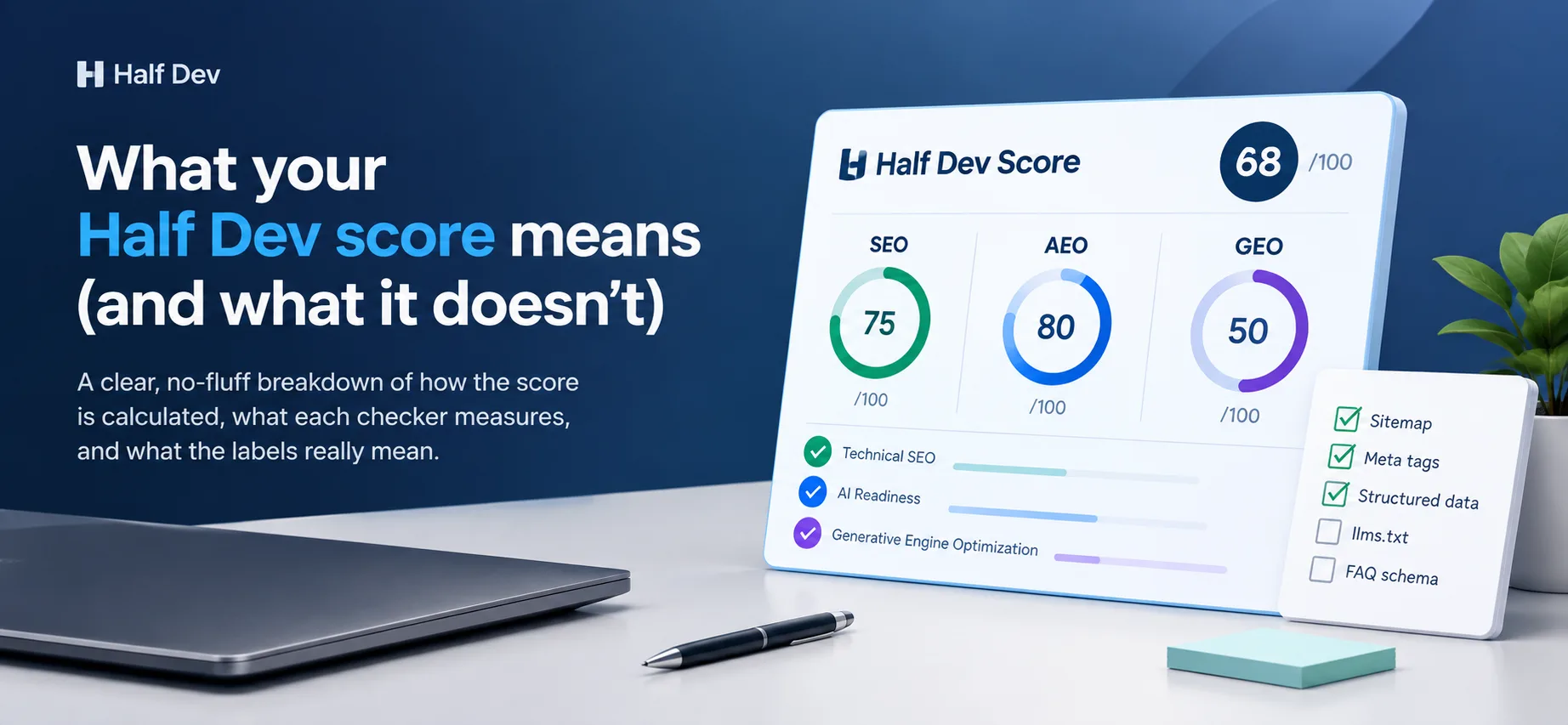
What the score is
Your score is the number of points a page earned on a fixed checklist, out of 100. It tells you how many of the basics are in place on that one page. It does not predict rankings, traffic or whether an AI tool will mention you.
Run it yourself with the SEO checker, the AEO checker or the GEO checker. Every scan runs all three, whichever one you start from.
How the score is built
Each checker scans one page and runs a set of rule-based checks. There are no AI guesses and no signup. The same page normally gives the same result each time you scan it, unless a fetch times out or a site refuses our checker.
| Checker | Checks | Points per check | Total |
|---|---|---|---|
| SEO | Sitemap, canonical tag, image alt text, internal links, title length | 20 | 100 |
| AEO | Structured data, meta and Open Graph tags, AI crawler access, heading structure, freshness | 20 | 100 |
| GEO | llms.txt, FAQ schema | 50 | 100 |
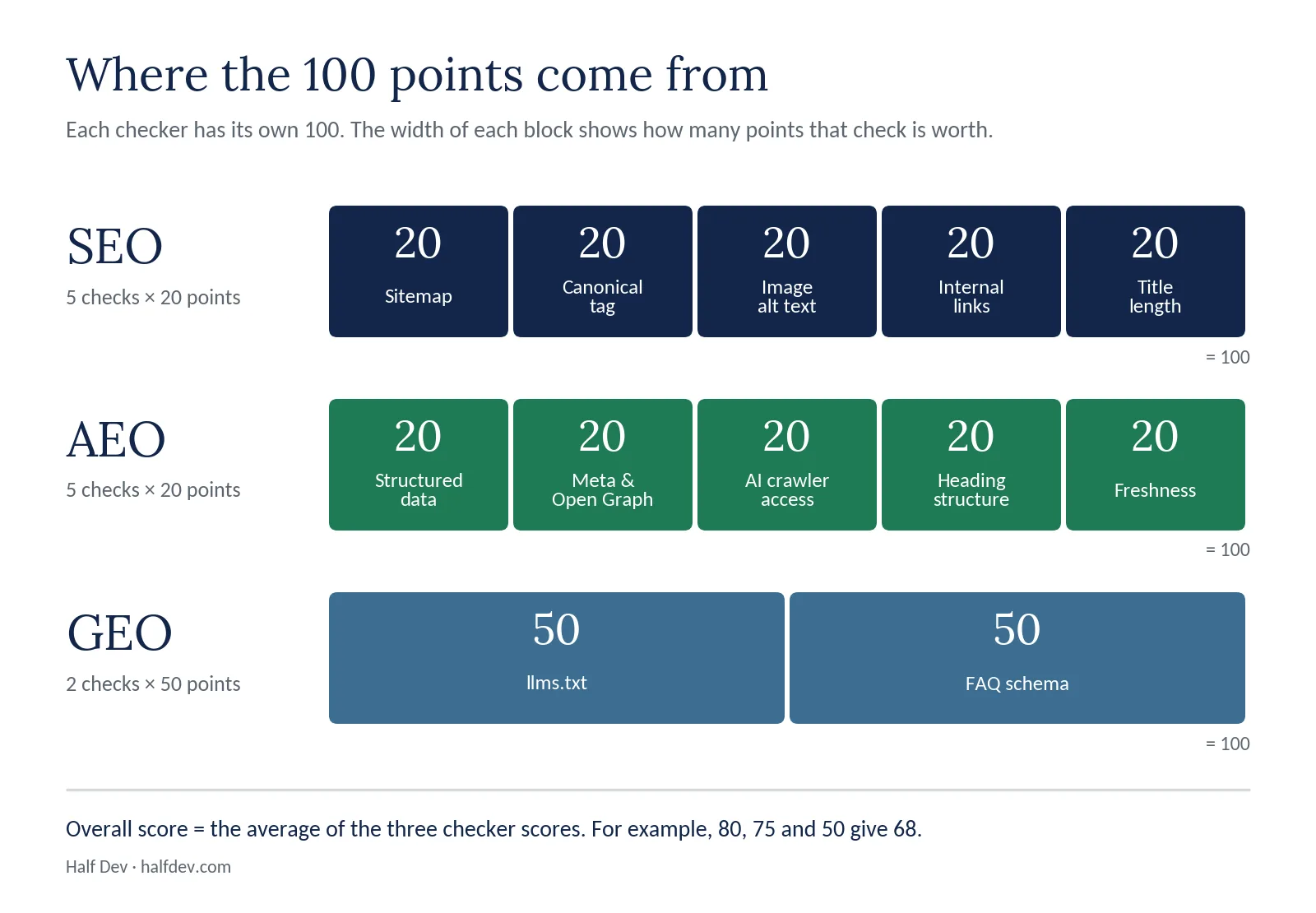
Where the 100 points come from in each checker.
Because GEO has only two checks, each one is worth half the score. A missing llms.txt file moves the GEO number a lot more than a missing alt text moves the SEO number. That is a feature of the checklist, not a judgment about which matters more for your site.
The overall score
The report also shows one overall number. It is the average of the three checker scores, so 80 for AEO, 75 for SEO and 50 for GEO gives 68. Treat it as a convenient summary. The three separate scores are more useful, because a site can be strong in one area and weak in another.
What the status labels mean
Each check ends in a status. The tool pages show Pass, Partial or Fail. The report uses four labels:
- Passed: full points.
- Partial: something is present but incomplete, so you get part of the points. This is the warning level.
- Weak: only a small share of the points. The report shows it with the same cross icon as Missing, so treat it as a fail, not a warning.
- Missing: the signal wasn't found, so no points.
How partial credit works
Most checks give full, part or zero credit, so one weak spot costs you a slice of a check, not the whole score. Here is how each check scores.
SEO checks (20 points each)
| Check | How it scores |
|---|---|
| XML sitemap | 20 for a valid sitemap at /sitemap.xml. 10 if the file doesn't look like a sitemap. 0 if there is none. |
| Canonical tag | 20 for any canonical tag, otherwise 0. No partial credit. |
| Image alt text | 20 if 90% or more of images have descriptive alt text. Below that, the share of 20 matches the share of images covered. A page with no images passes. |
| Internal links | 20 for three or more. 10 for one or two. 0 for none. |
| Title length | 20 for 50 to 60 characters. 12 for 30 to 49 or 61 to 70. 4 for anything else. 0 for no title. |
AEO checks (20 points each)
| Check | How it scores |
|---|---|
| Structured data | 20 for JSON-LD. 10 for microdata only. 0 for neither. |
| Meta and Open Graph tags | 4 points for each of five items: title, meta description, og:title, og:description and og:image. Full credit also needs a title of 10 to 70 characters. |
| AI crawler access | 20 if no AI crawler is blocked from the whole site. 10 if some of the 13 known crawlers are blocked. 0 if all 13 are blocked. |
| Heading structure | 20 for one H1 and no skipped levels. 14 for skipped levels. 10 for more than one H1. 0 for no H1. |
| Freshness | 20 for a date signal under a year old. 12 for an older one. 0 for none. |
GEO checks (50 points each)
| Check | How it scores |
|---|---|
| llms.txt | 50 for a plain-text file with a title heading. 25 for a text file without one. 0 if it is missing, empty, an error or a web page. |
| FAQ schema | 50 for FAQPage markup with at least one question. 25 for FAQPage markup with no questions. 0 for none. |
Each GEO check gives full, half or no credit, so the only possible GEO scores are 0, 25, 50, 75 and 100.
Two details catch people out. An empty alt attribute is correct for purely decorative images, but the scan counts it as missing. And a deliberate robots.txt block still lowers the AI crawler score, because the check measures access, not intent.

How partial credit worked in three real scans.
Here is what that looked like in practice. One scan had 1 of 6 images with descriptive alt text and scored 3.3 of 20. One site was missing a single Open Graph tag and scored 16 of 20. Two titles, at 49 and 66 characters, both scored 12 of 20, because each sat just outside the 50 to 60 range.
Fixing the quick wins is usually cheap. See how to fix missing image alt text, how to add internal links to a page, how to create and submit an XML sitemap, how to fix your heading structure, how to add publish and updated dates and how to add a meta description and Open Graph tags.
A worked example
This is the real report for halfdev.com, scanned on 7 October 2026.
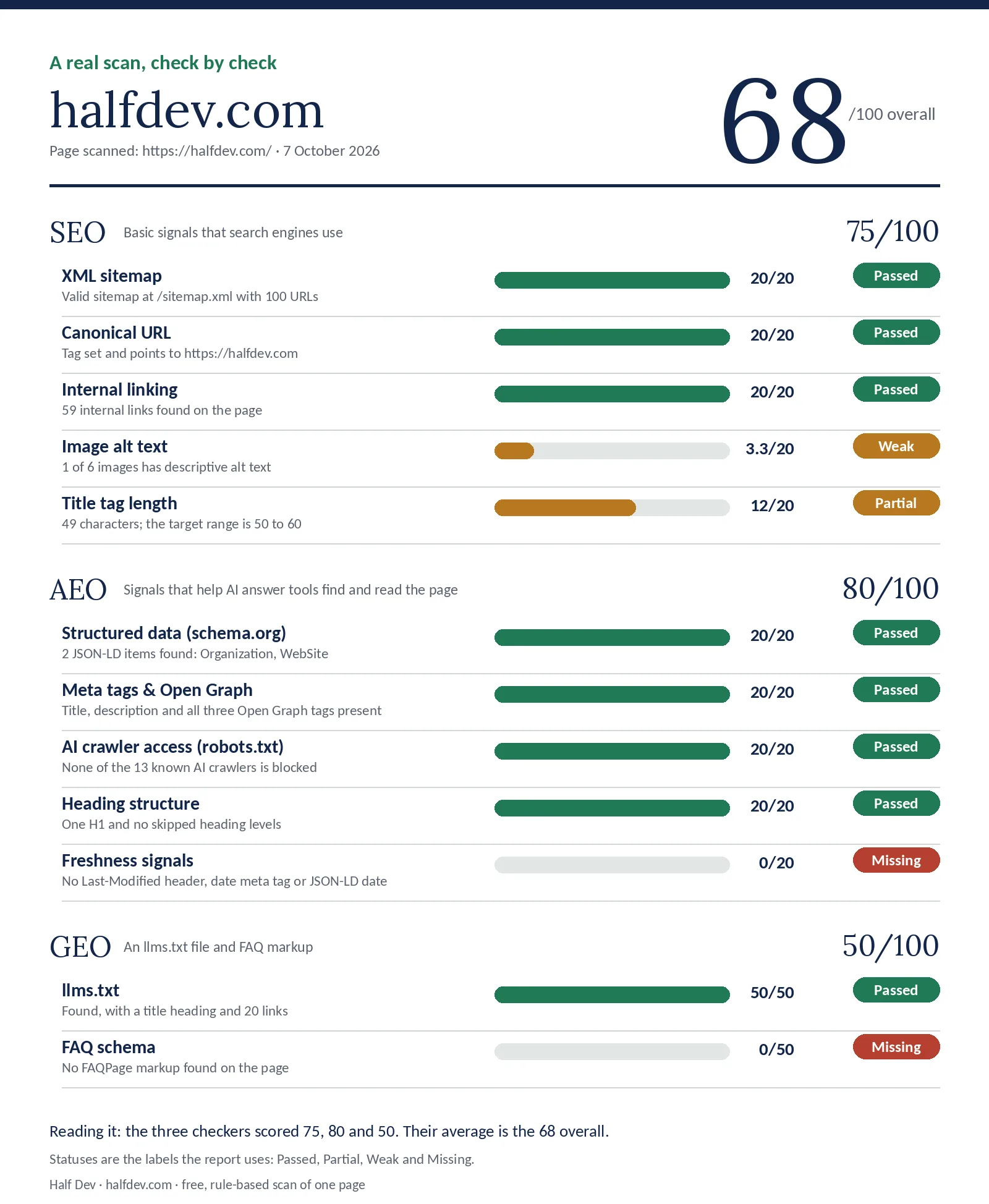
A real scan, check by check.
SEO: 75. The sitemap, canonical tag and internal links all passed with 20 each. Image alt text was Weak, with 1 of 6 images described, for 3.3. The title was 49 characters, a Partial for 12. That adds up to 75.3, shown as 75.
AEO: 80. Structured data, meta and Open Graph tags, AI crawler access and heading structure all passed with 20 each. Freshness was Missing, because no date signal was found, so it scored 0.
GEO: 50. llms.txt passed with 50 of 50. FAQ schema was Missing, so it scored 0 of 50.
Overall: 68. The average of 80, 75 and 50 is 68.3, shown as 68. The report orders its fixes by points at stake, so the 50-point FAQ schema comes first.
The three bands
Each checker's score falls into one of three bands. The overall number is best read the same way.
| Score | How to read it |
|---|---|
| 85 or more | Most of the basics are in place. Look at what's left. |
| 60 to 84 | A solid base with clear gaps. Fix the biggest ones first. |
| Under 60 | Several basics are missing. The list of fixes is the useful part. |
Each checker words its bands a little differently. SEO reads "search-engine ready", "partially optimized" or "needs SEO work". AEO reads "visible to AI search", "partially visible" or "needs work". GEO has only five possible scores, and only 100 reaches the top band.
A low score is a to-do list, not a verdict on your business. Many sites score low on a first scan because nobody added an llms.txt file or a few meta tags.
What a high score doesn't mean
A page can score 100 and still not rank. This scan does not look at:
- Backlinks or who links to you
- Page speed
- The quality or usefulness of your content
- Competition for the search you care about
- Anything beyond the one page you scanned
It also reads only the HTML your server returns and your robots.txt, so markup added by JavaScript after load, or a firewall that refuses AI crawlers, can go unseen. It does not tell you what any search engine or AI tool does with your page. A good score means you have removed some common obstacles. Nothing more.
How to use the score
- Scan your most important page, usually the home page or a key product or article.
- Read the failed and partial checks first. Fix the ones with the most points at stake.
- Make the change, then scan again. The number moves when the page changes. Each visitor can run 8 scans every 10 minutes.
- Scan a few different page types. A home page, an article and a tool page can score very differently.
- Track the score over time, but don't chase 100 for its own sake. A warning you've chosen deliberately, such as blocking a crawler on purpose, is fine.
For a fuller routine, see our SEO audit checklist for a new site. If you scan sites for other people, read how to use a free site scan for client audits. To see what the full report looks like, read what you get from a free page scan.
Why scores differ between checkers
A site can do well on SEO and poorly on GEO. They measure different things: SEO looks at classic page basics, AEO (answer engine optimization) at how clearly a page is structured to answer questions, and GEO (generative engine optimization) at newer files and markup. If you want to know the difference between the three, read SEO, AEO and GEO: what is the difference.

Three real scans, three different shapes. One site scored 86 on SEO and 0 on GEO.
Crawler access is a good example of the split. It is scored in the AEO checker, not the GEO one, and you can check it on its own with the AI crawler checker.
A note on newer checks
llms.txt is a proposed convention, not an official standard, and support varies by tool. It doesn't allow or block anything, and robots.txt still controls access. We include it because we publish one on our own sites, not because it is guaranteed to change anything. Read what llms.txt is, and whether you need one, or test yours with the llms.txt checker.
FAQ schema is still valid markup, but Google stopped showing FAQ rich results for all sites on May 7, 2026, so treat it as machine-readable Q&A, not a way to get expandable results. What FAQ schema does and does not do covers the detail.
Keep reading
Run the checks
Related posts
- SEO, AEO and GEO: what is the difference
- What is llms.txt, and do you need one
- What FAQ schema does and does not do
- SEO audit checklist for a new site
- What you get from a free page scan
- Which basic checks fail most often
- How to use a free site scan for client audits
- How we built the Half Dev report
- How to fix missing image alt text
- How to add internal links to a page
- How to create and submit an XML sitemap
- How to fix your heading structure
- Add a publish and updated date to your pages
- How to add a meta description and Open Graph tags
Comments
No comments yet — be the first.