


Link to at least three other pages on your own site from every content page, using normal HTML links with descriptive text. That is what the SEO checker looks for, and it is a sensible minimum for any content page. Pick pages a reader would genuinely want next.
What an internal link is
An internal link points from one page on your site to another page on the same site. Navigation menus and footers count as links, but the ones that matter most sit inside your content, where you decide what is related.
Why they matter
- Readers use them to keep going instead of leaving.
- Search engines follow links to discover pages and to understand how your pages relate. A page that nothing links to is hard to find.
- Descriptive link text tells people and crawlers what the next page is about.
This is basic site structure. It is not a trick, and it does not guarantee rankings.
How many do you need
The checker passes a page with three or more internal links, gives partial credit for one or two, and fails a page with none.
- 3 or more internal links in content: Pass.
- 1 or 2: Partial.
- 0: Fail.
Three is a floor, not a target. A long article may reasonably have more. A short page should not get extra links just to hit a number. There is no magic ratio: if every link points somewhere a reader would actually go next, you have the right amount. If you are hunting for places to squeeze one in, you have too many.
A before and after example
Here is a paragraph with no internal links:
Before you publish a new site, go through a full audit. Check that each page names one canonical URL so duplicates do not compete. Also make sure crawlers can find every page through a sitemap.
It reads fine, but a reader who wants to act on any of those three ideas has nowhere to go. Here is the same paragraph with three links, each placed where the topic comes up:
<p>Before you publish a new site, go through a
<a href="https://halfdev.com/quick-wins/seo-audit-checklist-new-site">full audit checklist for a new site</a>.
Check that each page names one canonical URL, and
<a href="https://halfdev.com/quick-wins/how-to-check-canonical-tags">check your canonical tags</a>
so duplicates do not compete. Also make sure crawlers can find every page, which is
<a href="https://halfdev.com/explainers/robotstxt-sitemapxml-llmstxt-explained">what a sitemap does</a>.</p>
The page now has three internal links, passes the check, and every link answers a question the reader just had.
How to add good ones
- Link where the topic comes up. If a paragraph mentions canonical tags, link there, not in a list at the bottom.
- Use descriptive anchor text. The words of the link should say what the page is about.
- Link to useful pages, not just popular ones. Related guides, the tool that does the job, a definition.
- Link back and forth. If post A links to post B, ask whether B should link to A.
- Add links from older pages to new ones. New pages start with no links pointing at them until you add some.
Weak anchors and better ones:
- Instead of "click here", write "check your canonical tags".
- Instead of "read more", write "what a sitemap does".
- Instead of "this page", write "our robots.txt guide".
The code
<p>Before you publish, <a href="/quick-wins/seo-audit-checklist-new-site">run through the new-site audit checklist</a>.</p>
Use a real <a href> element. Links that only work through JavaScript click handlers, or buttons that navigate with script, may not be followed by crawlers.
Relative links (/quick-wins/page) and full links to your own domain both count as internal. Don't add nofollow to your own internal links unless you have a specific reason.
Where to add them
- In the article body, which is the main place.
- In a related-posts block at the end of the page.
- In a tool box or call to action that points to a relevant tool.
Body links carry the most meaning because the surrounding sentence explains why the page is related. A related-posts block is a good backup, but it should not be your only source of links.
How to check
Count them on one page. Open the page and count the links in the content area that go to your own domain. Or run the SEO checker on the page and read the internal links result.
Find orphan pages. An orphan page is a page that no other page links to. A sitemap will not reveal these, because a sitemap lists pages whether or not they are linked. To find them:
- Export the list of URLs in your sitemap. The SEO checker shows how many URLs it found there, which tells you how big that first list should be.
- Crawl your site by following links from the homepage and export every URL the crawl reaches.
- Compare the two lists. Any URL in the sitemap that the crawl never reached is an orphan.
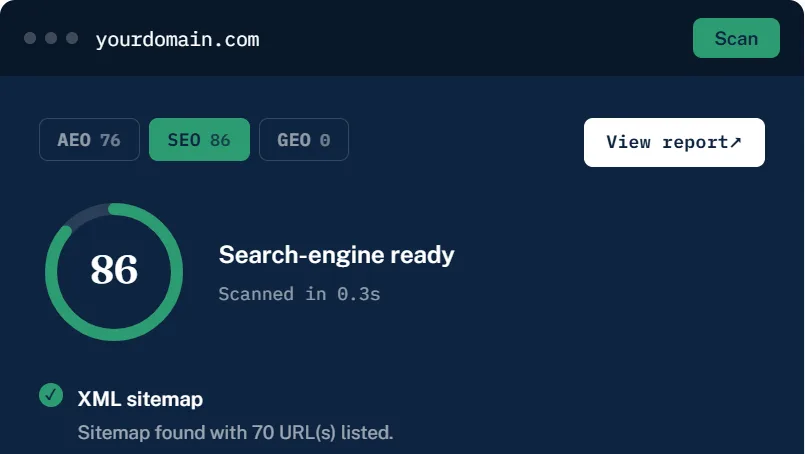
The checker's XML sitemap result reports how many URLs the sitemap lists, for example 70 URLs in a passing check. That count is your starting list for the orphan check.
For each orphan, find a related page and add a link in the body. If you are not sure how your sitemap should look, see how to create and submit an XML sitemap.
Common mistakes
- Using "click here" for every link.
- Linking only from the menu and never from content.
- Pointing links at redirected or deleted pages.
- Linking the same page ten times in one article.
- Stuffing a block of keyword links at the bottom of every page.
- Adding links to pages with no useful content just to raise a count.
Internal links also help with other on-page basics. A page with good links but images missing descriptions still has gaps, so see how to fix missing image alt text as a next step.
The short version
Three internal links in the content is the floor. Put each one where the topic comes up, describe the destination in the anchor text, use a real <a href>, and make sure no page is left without a link pointing at it. Then run the SEO checker to confirm.
Comments
No comments yet — be the first.