robots.txt and a sitemap are standard for most sites, and llms.txt is a newer convention that no search engine requires. They do different jobs, so none replaces another. robots.txt sets crawl rules, a sitemap lists the pages you want found, and llms.txt is a curated guide written for language models.
This guide explains each file, how they fit together, the mistakes that cause the most damage, and how to check yours.
The three files at a glance
| File | Where it lives | Main job | What it cannot do |
|---|
| robots.txt | Site root, at /robots.txt | Tells crawlers which paths they may fetch | Remove pages from search or enforce access |
| sitemap.xml | Usually the site root, and often listed in robots.txt | Lists the URLs you want found | Guarantee crawling or indexing |
| llms.txt | Site root, at /llms.txt | Guides language models to your best pages | Allow or block anything, or affect Google Search |
Crawling, indexing and permission are different things
Most confusion about these files comes from mixing up three ideas. Crawling is a bot fetching a page. Indexing is a search engine storing that page so it can appear in results. Permission is whether a bot is allowed to fetch the page in the first place.
robots.txt controls whether a crawler fetches a page. It does not directly control indexing. A sitemap helps with discovery, which comes before crawling. llms.txt does neither. It is a reading guide for models.
That is why a page can be crawled but not indexed, and why a blocked page can still show up in results. Search Console's Page indexing report shows the gap. It lists how many pages are indexed and gives the reasons others are not, including "Indexed, though blocked by robots.txt".
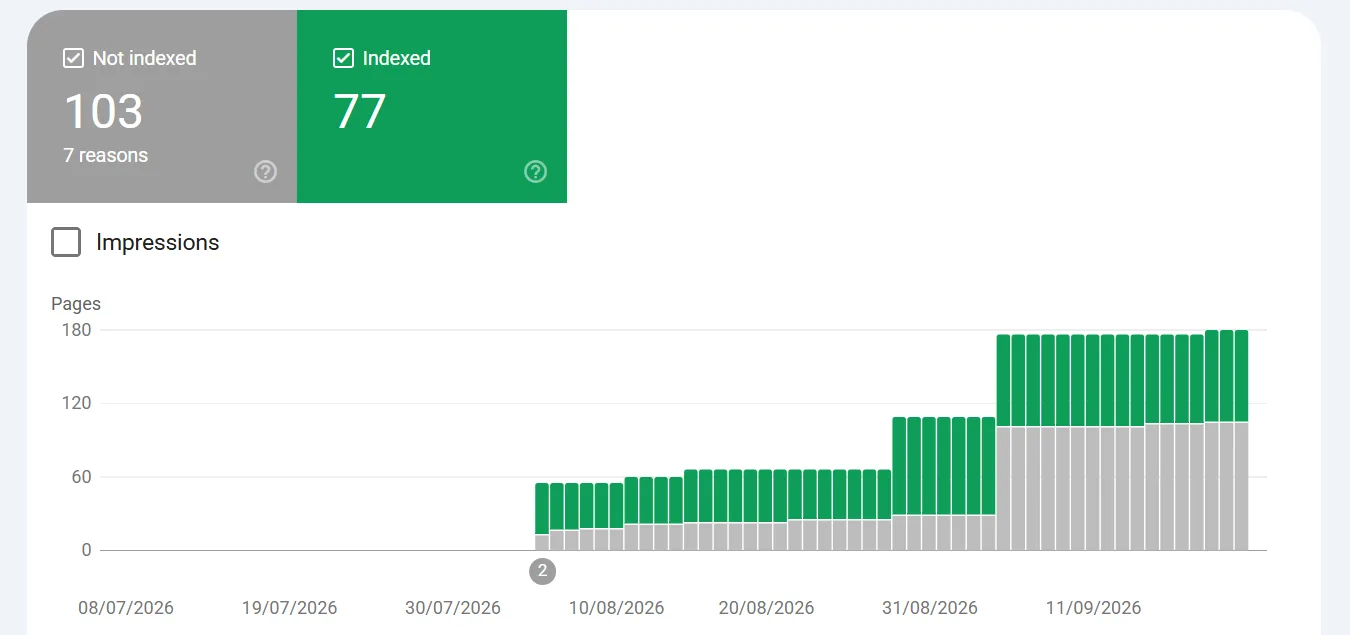
The Page indexing report in Search Console for thetriptales, one of our sites, showing 77 pages indexed and 103 not indexed across 7 reasons. Captured 6 October 2026.
What robots.txt does
robots.txt sits at your site root and tells crawlers which paths they may or may not fetch. It is a request that well-behaved crawlers follow, not access control. It is also where you set separate rules for AI crawlers such as GPTBot, which our guide to allowing or blocking GPTBot covers.
User-agent: *
Disallow: /admin/

Sitemap: https://example.com/sitemap.xml
Our own robots.txt at halfdev.com, with separate rule blocks for AI crawlers such as GPTBot and ClaudeBot. Captured 6 October 2026.
A few details trip people up. The file must live at the root of the host, for example example.com/robots.txt, and a file in a subfolder is ignored. It applies only to the host and protocol it is served from, so the www and non-www versions of your site should each return it. The file is public, so anyone can read it, and listing a private path there advertises it. Use a login for anything that must stay private. And blocking a page in robots.txt does not remove it from Google. If other sites link to a blocked URL, it can still appear in results without a description. To keep a page out of search, add a noindex tag and leave the page crawlable so the tag can be read.
<meta name="robots" content="noindex">
A wrong rule can also shut out AI bots you wanted, so see how to fix robots.txt blocking AI bots by accident.
The robots.txt report in Search Console for thetriptales, one of our sites. Google checked four versions of the file (http and https, with and without www) and fetched each one with no issues. Captured 6 October 2026.
What a sitemap.xml does
An XML sitemap lists the URLs you want search engines to find, often with last-modified dates. It helps discovery. It does not block anything, and Google says it does not guarantee that every listed page is crawled and indexed.
<?xml version="1.0" encoding="UTF-8"?>
<urlset xmlns="http://www.sitemaps.org/schemas/sitemap/0.9">
  <url>
    <loc>https://example.com/page</loc>
    <lastmod>2026-01-15</lastmod>
  </url>
</urlset>
Google accepts up to 50,000 URLs or 50 MB uncompressed per sitemap file, so larger sites split theirs into several files. Keep lastmod honest, because Google says it uses the value when it proves consistently accurate. Our guide to creating and submitting an XML sitemap walks through the steps.
The Sitemaps report in Search Console for thetriptales, showing a submitted sitemap with a Success status and 72 discovered pages. Captured 6 October 2026.
What llms.txt does
llms.txt is a proposed Markdown file at /llms.txt that gives a model a short summary of your site and links to your most useful pages. It does not allow or block anything. It is a community proposal rather than an official standard, and support varies by tool. Google Search ignores it, so it neither helps nor harms your Google rankings. For the full background, read what llms.txt is and whether you need one.
# Example Site
> One-sentence summary of what the site offers.

## Key pages
- [Pricing](https://example.com/pricing): Plans and costs
- [Docs](https://example.com/docs): How to get started
If you decide to publish one, how to write an llms.txt file, with a template shows the format step by step.
How they fit together
robots.txt   what crawlers may fetch
sitemap.xml  which pages exist and when they changed
llms.txt     which pages matter most, in plain language
You can point to your sitemap from robots.txt with a Sitemap line that gives the full URL, and you can list more than one. llms.txt stands alone.
Do you need all three
Most sites benefit from robots.txt and a sitemap. Google says a very small site that is well linked internally may not need a sitemap, and also says that in most cases a site benefits from having one. No search engine requires llms.txt, and nothing breaks without it. Our own sites are still being built out and updated, but all three publish all three files, because we treat llms.txt as part of the foundation and it is cheap to publish. We do not claim it lifts rankings or guarantees that an AI answer cites you.
Common mistakes
- A leftover block from staging. A
Disallow: / copied over from a test site tells every crawler to skip the whole live site.
- Blocking CSS or JavaScript. If Google cannot fetch the files a page needs, it may not render the page the way visitors see it.
- Treating robots.txt as a privacy tool. The file is public, and a blocked URL can still be indexed from links elsewhere.
- Listing the wrong URLs in the sitemap. A sitemap should hold the pages you want indexed. Leave out redirected, blocked and noindexed URLs.
- A sitemap with the wrong host or protocol. URLs that use
http or the wrong domain do not match the site you are submitting.
- An outdated llms.txt. Links to deleted or renamed pages send models to dead ends, so only publish one you will keep current.
How to check yours
Start in the browser. Open /robots.txt, /sitemap.xml and /llms.txt on your own domain and confirm each one loads as plain text or XML, not a 404 or a redirect to the homepage. Then open Search Console and review the robots.txt report, the Sitemaps report and the Page indexing report, which show what Google actually found and fetched.
The SEO checker scans one page and reads your robots.txt, sitemap.xml and llms.txt, along with a few on-page checks. The llms.txt checker tests whether your llms.txt exists and is in the expected format. For the wider picture, work through the SEO audit checklist for a new site.
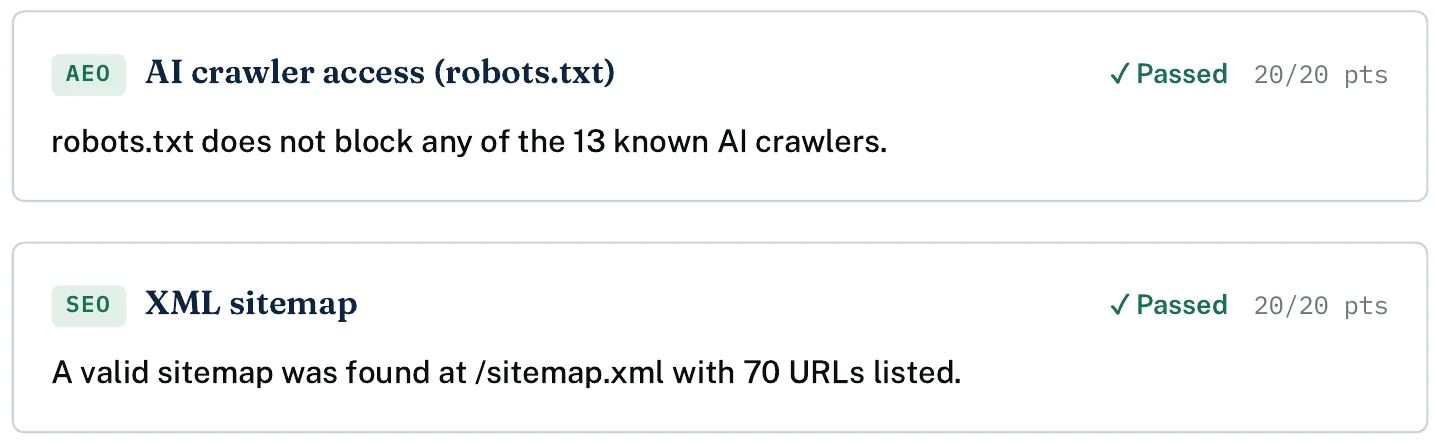
Two checks from our scan report for getcoretech.net: AI crawler access in robots.txt and the XML sitemap. Captured 6 October 2026.
Rankings and recommendations reflect our own testing and criteria. Pricing and features change often — always confirm current details directly with the provider.




Comments
No comments yet — be the first.