

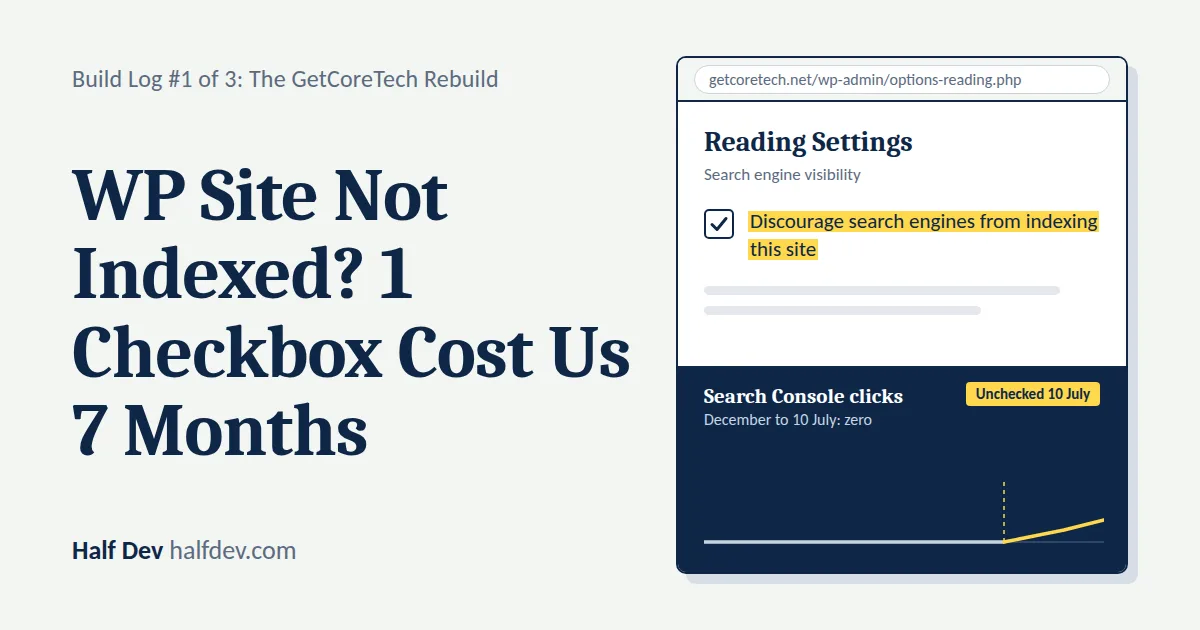
Disclosure: getcoretech.net is my brother's site, which I now help run. All screenshots and Search Console data in this series are from that site.
Part of the series Rebuilding a Dead WordPress Site: The Full Series.
The Setup
In December 2025, my brother paid his boss to build him a website: getcoretech.net. It was built on WordPress, with Nitropack for performance, and it went live. Over the following months, my brother published more than 40 articles on it.
For months it got nothing. Zero clicks, zero impressions.
For the first few months he figured that was normal, because everyone says SEO takes time. But after three or four months of silence he started asking his boss to look at it. Why isn't it getting any clicks? Not even one? His boss didn't find anything. After a while my brother stopped posting, stopped checking analytics and stopped caring. If you've ever put real time into something and gotten total silence back, you know that particular kind of quiet giving-up.
Then I built him thetriptales.com, a travel blog, from scratch, and it went fine. Almost as an afterthought, he said: "Can you also look at that other site? See what's wrong with it?"
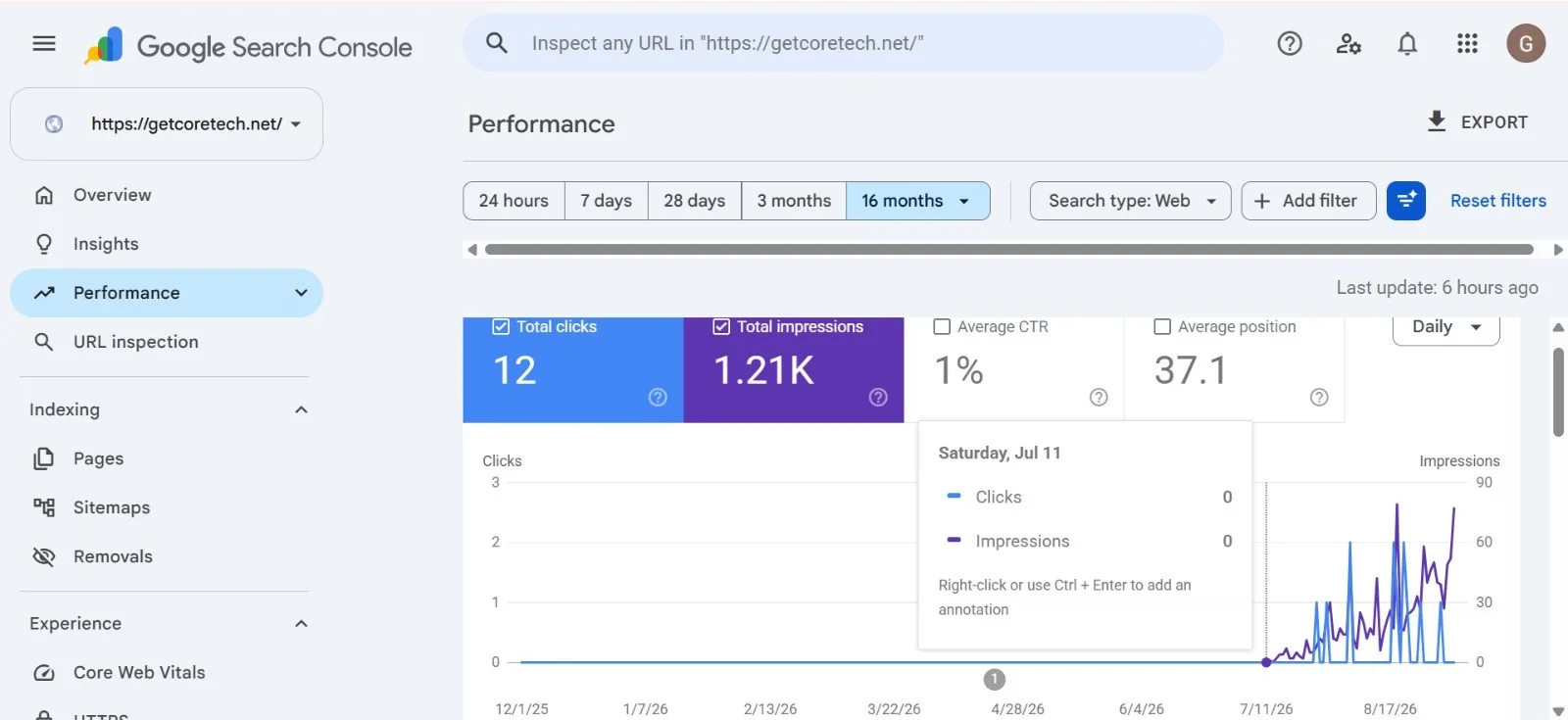
Search Console performance graph from 12/1/25 onward, flat at zero until July 2026, the "before" screenshot
Why Zero Traffic for 7 Months Usually Isn't a Content Problem
I didn't start by reading his articles. Zero impressions for seven months, with 40+ articles published, isn't how a content problem looks. Even mediocre content on a real domain usually picks up some impressions in that time. Total silence points at something structural, underneath the content.
So I opened Google Search Console first. The indexing report showed page after page sitting in "Not indexed," the entire time the site had been live. If that status is unclear, here's the difference between crawled, indexed and ranked.
The WordPress Setting That Blocks Google From Indexing Your Site
I went looking for the cause, and it didn't take long. Under Settings → Reading, WordPress has an option called "Search engine visibility," with a checkbox labeled:
Discourage search engines from indexing this site
It was checked. That was the whole problem.
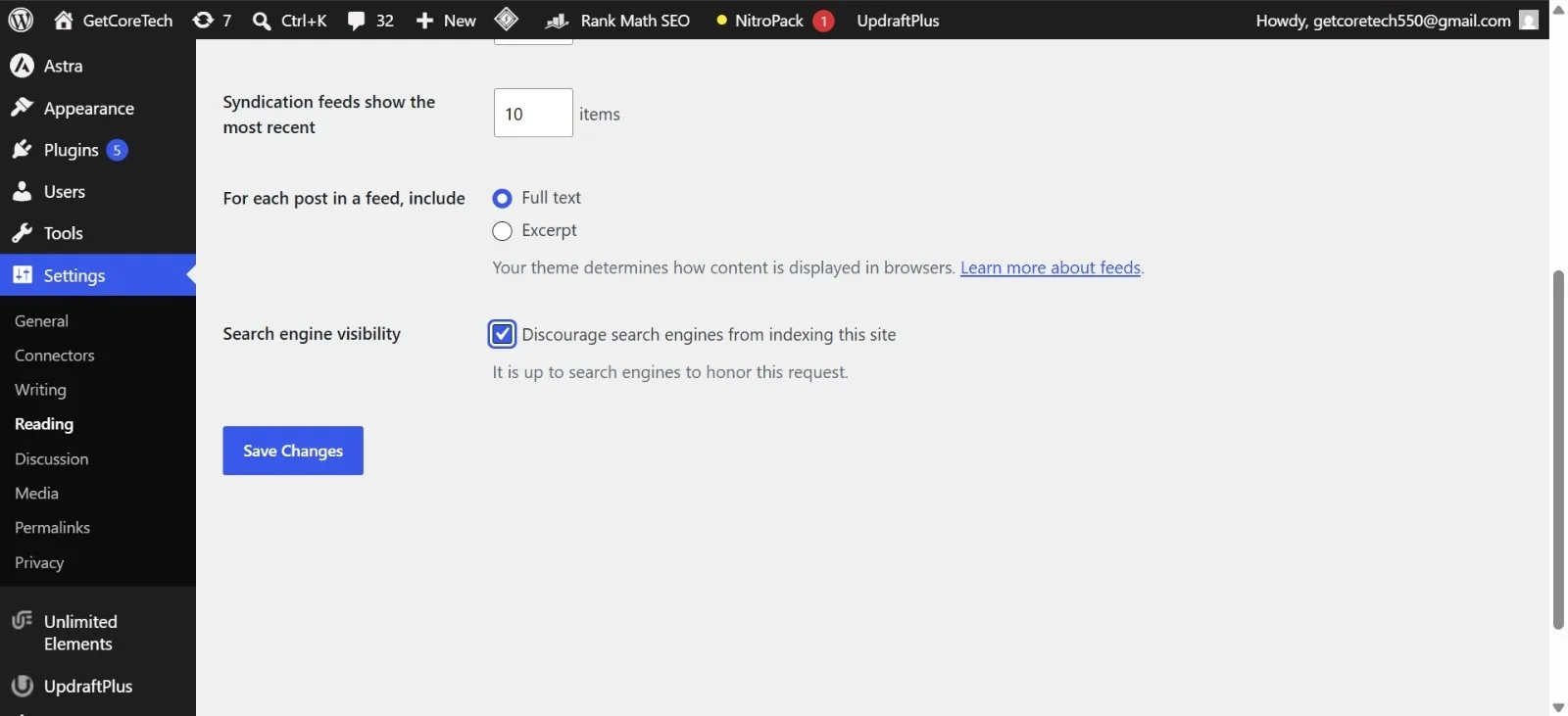
WordPress Settings → Reading screen showing the "Discourage search engines from indexing this site" checkbox checked
What does "Discourage search engines from indexing this site" actually do?
When the box is checked, WordPress tells search engines not to index the site by adding a noindex instruction (here's how noindex differs from robots.txt and canonical). Google respects it. It doesn't matter how many articles you post or how good they are. While that box is checked, your site is effectively invisible to search. For more, see what the setting does, in detail.
Why does this setting exist, and why does it get missed?
It exists so unfinished and staging sites don't get indexed before they're ready. That's a sensible safeguard, and here's why WordPress turns it on by default. But it's easy to leave checked after launch, because nothing warns you. There's no error message and no banner. The site just sits there, fully built and full of content, getting nothing.
What Happened When I Told Him
In early July, after I found the setting, my brother went to his boss and showed him. I don't remember the exact day, but it was the first week or so of the month. As my brother tells it, the setting was still checked when he showed it, and his boss said he'd look at it once he had some time.
Then nothing happened. The fix was a thirty-second checkbox, on a site someone had been paid to build and maintain, and it stayed checked. If you're in the same spot, here's when the person who built your site won't fix it.
So around 10 July, I unchecked the box myself and saved.
The Fix, and What Happened Afterward
Impressions started appearing right after that. The pattern is clear in Search Console: a flat line at zero from December through early July, then a trickle that begins the moment the box came off.

Google Search Console page indexing graph showing pages starting to be indexed in July after the noindex setting was removed
Indexing was gradual, too. Page indexing in Search Console shows no pages indexed in June, then more pages getting picked up from July onward, with many still waiting by early September.
Between 10 July and 11 September, the site picked up 12 clicks and about 1.21K impressions, at an average position of 37.1. That's small, but compared with seven months of exactly zero, the size isn't the point. The site had gone from invisible to visible.
On 12 September I relaunched the site after a full redesign (the next post covers that). Between 12 September and 8 October 2026, Search Console shows 65 clicks and 12.4K impressions, with an average position of 7.7 and a click-through rate of 0.5%. That window covers the relaunch itself, so these numbers reflect the new site, not the checkbox alone.
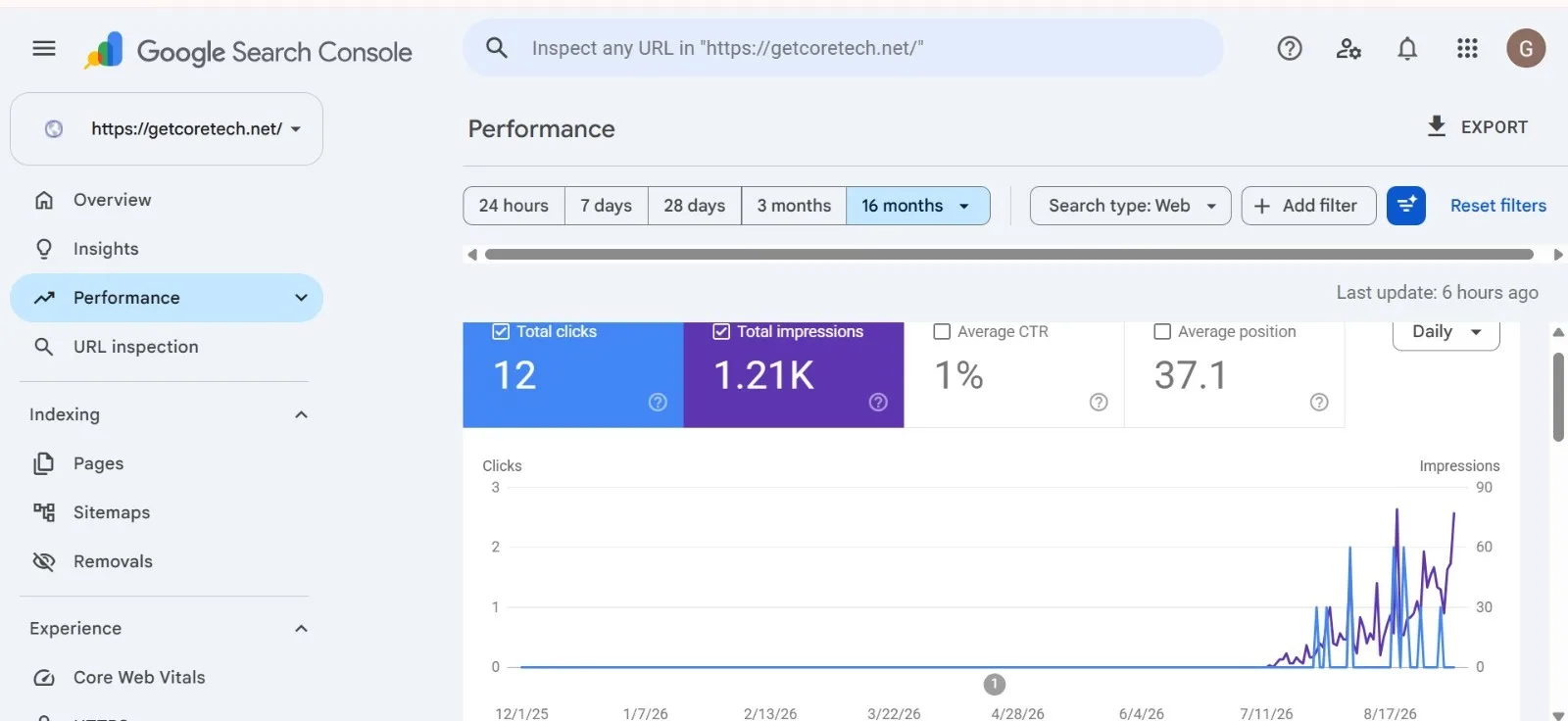
Search Console performance graph, 16-month view, showing impressions starting in July
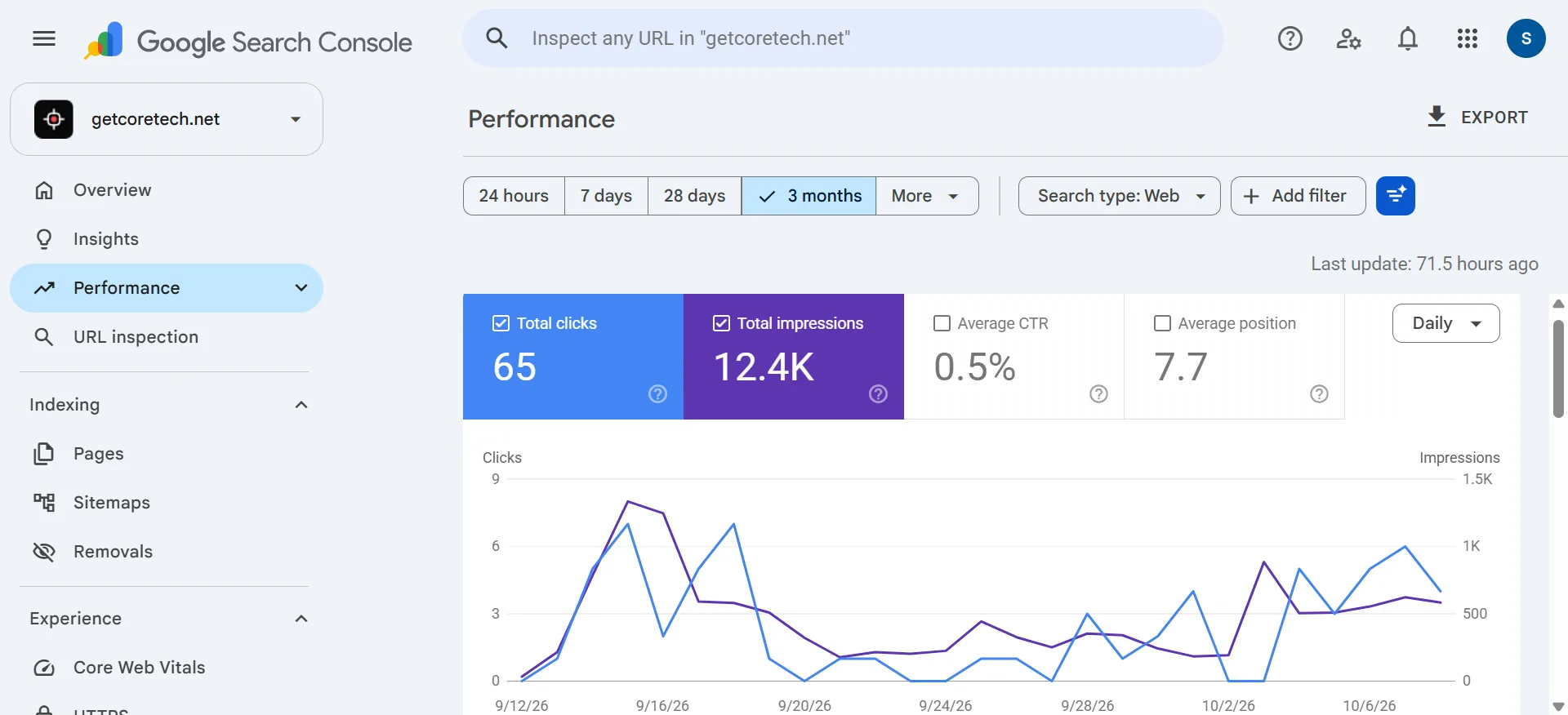
Search Console performance graph, 12 September to early October, showing the relaunch spike and the pickup in early October
I don't want to oversell this. The numbers are early, the click-through rate is low, and the graph dipped after its peak in mid-September before picking up a little in early October. The checkbox fix on its own produced a trickle. The jump came after the redesign, though indexing was still catching up during that time, so I can't credit one cause alone. None of it could have happened, though, while the site was blocked.
What This Site Actually Needed Next
Once the site was crawlable, I went through it more carefully and found more problems: leftover lorem ipsum on live pages, broken links, and a bare, generic theme with no real styling work.
The footer "About" text was the example that stuck with me. It was the standard lorem ipsum paragraph, the one that explains what lorem ipsum is, and it had been live on a real domain the whole time. Nobody had gone back and replaced it.

The old footer "About" text showing the lorem ipsum paragraph
I'd have rated the site about 4 out of 10 at that point: indexed, but far from finished. I cover the full audit, the redesign, the broken links, the theme rebuild and the custom admin panel in Post 2.
The Takeaway
If a site has been live for months with zero organic traffic, check the basics before assuming it's a content problem or just needs more time.
Go to Settings → Reading in WordPress and confirm "Discourage search engines from indexing this site" is unchecked. It takes ten seconds. You can also check how a page looks to search engines.
Zero traffic for months isn't always a patience problem. Sometimes it's a single toggle, and no amount of waiting flips it. If the checkbox isn't the cause, here are the other causes of zero traffic.
If someone else built or manages your site, ask early whether indexing is confirmed working in Search Console, not just whether the site is "live." Live and indexed are different things, and the gap between them can cost you months. Before you call any site done, run through a 5-minute website audit.
You can see the current site at getcoretech.net.
Related Posts
- What "Discourage Search Engines" Actually Means
- Why Is "Discourage Search Engines" On by Default?
- WordPress Getting 0 Traffic? Check These 5 Things
- When Your Web Developer Won't Fix Your Site
- robots.txt vs noindex vs canonical: Which to Use
- Crawled vs Indexed vs Ranked: What Each Means
This is Post 1 of 3 in Rebuilding a Dead WordPress Site: The Full Series, on rebuilding getcoretech.net. Post 2 covers the audit, the redesign and the custom admin panel. Post 3 covers why I moved the site from WordPress to Next.js.


great